
Clicking on the down arrow within the search bar will allow you to select all reports within a category, or to limit searches to a specific category.
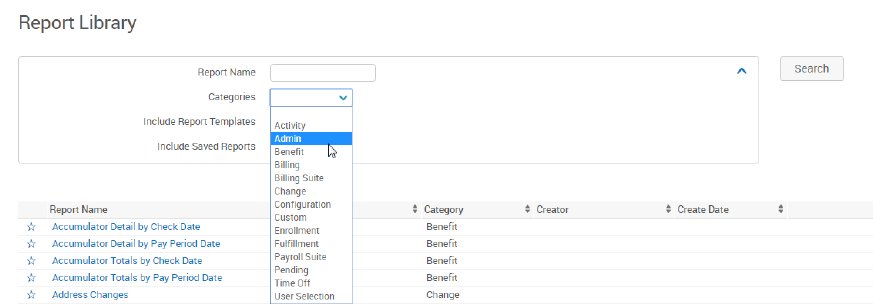
A description of reporting categories is below:
| Section | Description |
|---|---|
| ACA | These reports provide information about bswift’s ACA and shared responsibility tools. |
| Activity | These reports provide information about logins and other activity at a site. |
| Admin | These reports provide information about the data stored in Employee profiles, including audit reports, census reports, demographic data, and more. |
| Benefit | These reports provide information about Employee and dependent benefit coverage, such as plan selection, cost and coverage effective dates, and cost information. |
| Billing | These reports provide billing-related information, including imputed income, payroll deductions, and PCORI & transitional reinsurance counts. |
| Billing Suite 2.0 | This suite of tools and reports provides benefit and fee billing capabilities. |
| Change | These reports provide information about changes to Employee or dependent information, such as benefit class changes, beneficiary changes, changes to demographic information, and more. |
| Configuration | Configuration reports provide information about a client’s site, benefit plan, and enrollment rule structure. The reports allow administrators to quickly view information without having to go into the configuration pages to find out the settings. |
| Custom | These reports allow clients to create and save reports that contain only fields that are specified by an Administrator. Custom reports include comparison reports, comprehensive snapshots, and deduction snapshots. |
| Fulfillment | For clients who track solicitations for life events, dependent verification, etc., Administrators can use fulfillment reports to distribute fulfillment documents to employees. |
| Enrollment | These reports provide information about the completion status of enrollments where Employees are responsible for making their own elections, including company-wide (open) enrollments, new hire enrollments, and more. |
| Pending | These reports allow administrators to approve pending enrollments or changes made by Employees to their demographic information. |
| Payroll Suite | This suite of tools and reports allows clients to generate payroll deduction information that utilizes and applicably defined payroll schedule. |
| Offline | Reports that have been run offline or that run on a recurring schedule are stored on the Offline Reports page. |
Each section has multiple template reports you can choose from. See the appendix for common reports you will likely use in each section.
Once you’ve selected a report, it will open with the default selections for that template.
No Codes Reports
bswift stores some data in bswift-specific codes (For example, the Employee + Family tier is a code of “8”). Some reports offer ‘No Codes’ versions that will give results in user-friendly descriptions. If there is a No Codes version of a report available to you, you should choose that version.