
Rehires within 60 days of their termination
If an employee is rehired within 60 days of their termination date, they will be automatically reinstated—based on the effective-date rule—into the benefit plans they were previously enrolled in. A rehire enrollment window will open if the employee wants to make change. If the rehire data is not being automatically imported and you are entering it manually, you should use the “Re-Hire Employee” button to ensure the reinstatement process works correctly.
Rehires after 60 days
For employees rehired after 60 days, follow the steps below when entering the data manually. In this situation, only a rehire enrollment window will open. You may still use the “Re-Hire Employee” button, but it will only auto-update the rehire date, employment status, and their login. Profile, Employment, Compensation and Benefit fields will still require manual review and updates.
- Do not remove current termination information.

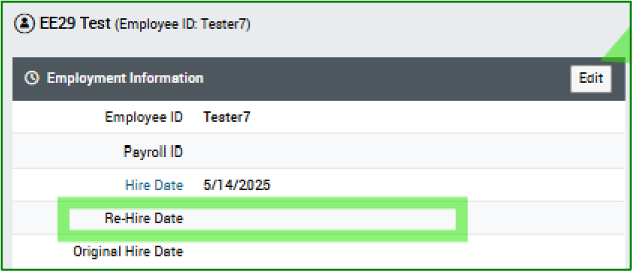
- In the Employment tab put in the New Hire Date in the Re-Hire Date field.
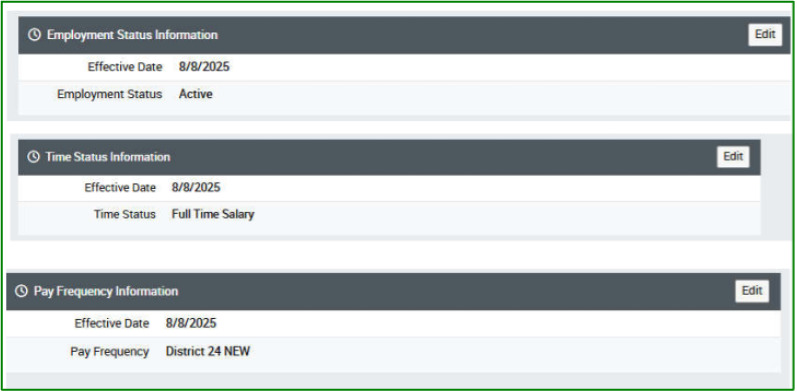
- Update the Effective Date to match the new Re-Hire Date in the Employment Tab. In addition, you will need to update Employment Status Information, Time Status Information and Pay Frequency.
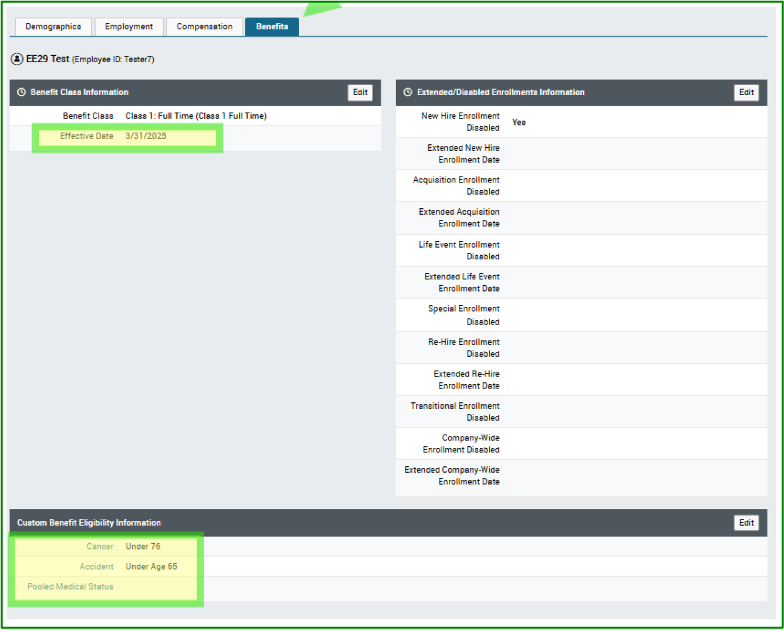
- Benefits Tab Changes: Benefits Class Information, Custom Benefit Eligibility Information. *Custom Benefit Information needs to be reviewed.
- Go to Demographics Tab after changes are made and update Login Enabled “yes”, Effective Date can be 1/1/1901 and the End Date can be 12/31/9999.